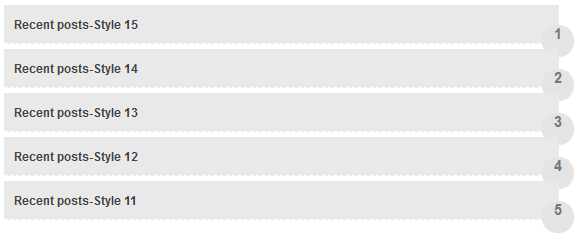
In last article I described how to create a How to create an Attractive Recent Comments widget and in here I describe how to create a Recent Posts Widget for Blogger Text CSS Hover Effect with jQuery Showing Recent Posts Widget is a great way to keep the visitor Browsing spend more time and view more pages.Now here is wonderful trick to display Advanced Recent Posts Widget to get people interested in what you have to say. How to Add Beautiful Recent posts text widget with Hover Effect To Blogger. I really hope you enjoyed Multi colored Text Recent Posts Widget with CSS & jQuery. attracts your visitor increase Page views. Wish your website's ranking quickly on Top Google, Yahoo, Bing and Alexa!.
Already I have published a post on How to create a Animated Recent post widget with thumbnail So read it also.
Let's start doing the tutorial
Step 1 - Log in to Your Blogger Account.
Step 2 - Go to your Blogger Dashboard and Click on Layout tab from left pane
Step 3 - and click on Add a Gadget link.
Step 4 - After click on Add a Gadget link A pop-up box will open now.Choose HTML/JavaScript from the gadget options by clicking the blue plus sign for that gadget.
Step 5 - Select one style and Past the related code given below.
Style 01
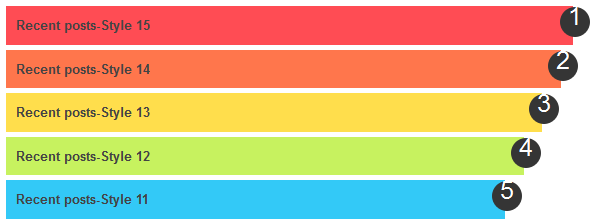
Already I have published a post on How to create a Animated Recent post widget with thumbnail So read it also.
Let's start doing the tutorial
Step 1 - Log in to Your Blogger Account.
Step 2 - Go to your Blogger Dashboard and Click on Layout tab from left pane
Step 3 - and click on Add a Gadget link.
Step 4 - After click on Add a Gadget link A pop-up box will open now.Choose HTML/JavaScript from the gadget options by clicking the blue plus sign for that gadget.
Step 5 - Select one style and Past the related code given below.
Style 01

Style 07
Style 08
Style 09
Style 10
Style 11
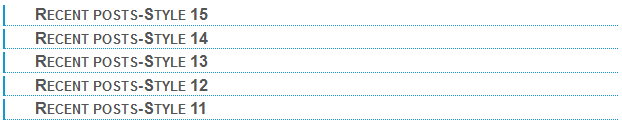
Style 12
Style 13
Style 14
Style 15
Animated recent post widget is a fantastic way to updates to your readers highlighting what are your recently published post. It will help your readers to find your recent post and it will increase attraction to your site/blog and traffic. The effect of smooth scrolling attract readers and generate more clicks to your site.
This gadget displays your most recent posts and includes a small thumbnail, but has the added bonus of using an animated effect that moves smoothly through the posts.There are a lot of great tutorials discussing on how to add Animated Recent posts for blogger with thumbnails and Simple Spy, but most of the tutorials I've found are not really suitable for a beginner.
Follow below steps to add this widget to your blog
Step 1. Login to your Blogger account and then dashboard.
Step 2. Go to Layout > Add A Gadget.
Step 3. In Add A Gadget window, select HTML/Javascript.
Step 4. Copy the code below and Paste it inside the content box.
Step 2. Go to Layout > Add A Gadget.
Step 3. In Add A Gadget window, select HTML/Javascript.
Step 4. Copy the code below and Paste it inside the content box.
Step 5. Pace gadget in a suitable place and save
In last article I described you how to create a related posts widget and So here is the recent comments widget for blogger and this is very easy to use, before we tell you the method of adding comments widget to your blogger blog we have to discuss the way that how does it work and how does it looks.Exactly this widget create thea new looks on your comment section.
Well if any new person came to your blog and want to see that is this active blog then he just look on the comment section blog and the new comments on your blog is appeared on the left side then the new user easily know that this is active blog, so this is one of good way to remain your blog look active.
Follow these steps to add this widget to your blogger blog.
- GoLog in to your blogger Dashboard
- Click on Layout of blogger blog
- Click on Add a gadget on the page
- Now a new window appear and click on HTML/Javascript after scrolling the box to down
- Copy past the blow code into the field
Remember
Change "Your blog.com" in to your actual blog address.
Enjoy this widget
In last article I described you how to add a recent post widget to your blog and now I am going to describe you build a another important widget as my title. Adding Related Post Wwidget Ffor Yyour Blog With Thumbnail. It is very important to add the gadget because it will increase the visitors on your site without spending to much time on SEO. If you really interested to and want to display the related posts in which the posts are open you just have to edit some steps that I tell in here,
There are also many other related post widget over there but this one is also contain the thumbnail. There for Add attractive and meaningful image to your posts. You can see that image in this thumbnail.
So here is what you have to do, it is very simple and easy
There are also many other related post widget over there but this one is also contain the thumbnail. There for Add attractive and meaningful image to your posts. You can see that image in this thumbnail.
So here is what you have to do, it is very simple and easy
- Go to blogger dashboard.
- Click on the Template section.
- Then click on Edit HTML Button.
- Find </head> code in template.
- Now paste Below code on above </head> tag
- Now find <div class='post-footer'> code in template.
- Paste below code above <div class='post-footer'> code.